[suanboard monotone logo : 2777 bytes]
[header decor line : 64 bytes]
HOME RULE FAVOURITE MEMBER ZONE REACTIVATE FORGET PASSWORD    

SEARCH [icon freecompose : 217 bytes]
[icon register : 195 bytes] สิทธิพิเศษสำหรับสมาชิก : โพสต์รูป, รูปแบบตัวอักษร, ไอคอน, bookmark, ค้นหาข้อความ ฯลฯ [icon login : 178 bytes]

[icon-delete : 101 bytes]
" วิธี Create Game >> WarcraftIII โดยไม่ต้องสมัคร vip (forward port) "
เห็นมีหลายคนเล่น DotA แล้ว create game ไม่ได้ เลยเอาวิธี forward port มาฝากครับ

ปล. ช่วงนี้ไม่ค่อยมีเวลาเท่าไหร่ มีคำถามไรก็ถามมาแล้วกันนะครับ ถ้าตอบได้จะตอบ(ช้าหน่อยนะ)

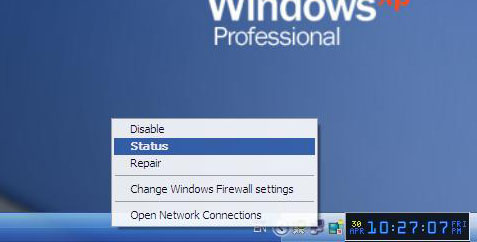
เริ่มด้วยภาพแรก คลิกขวาที่รูปคอมพิวเตอร์สองรูป(internet) เลือก Status

30 เม.ย. 53 / 23:07
0 0
true@life [icon smile : 92 bytes] (4748) : n/a : n/a : n/a
view 3312 : discuss 15 : rating - : bookmarked 0 : vote 0 58.9.160.113

#1# - 613579 [icon-addtodelete : 101 bytes]
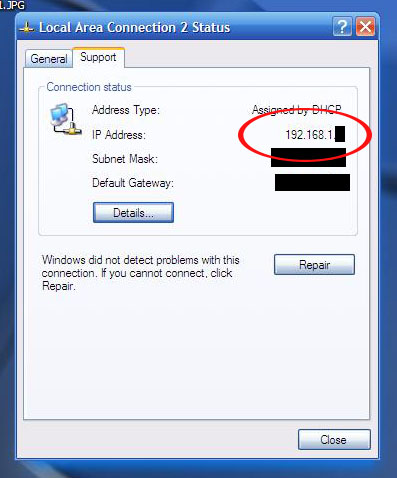
[member icon] 2. ดูหัวข้อ support แล้วจำ ip address ของเครื่องครับ เช่นของผม 192.168.1.X

30 เม.ย. 53 / 23:09
0 0
true@life [icon smile : 92 bytes] (4748) : n/a : n/a : n/a
followup id 613579 58.9.160.113

#2# - 613584 [icon-addtodelete : 101 bytes]
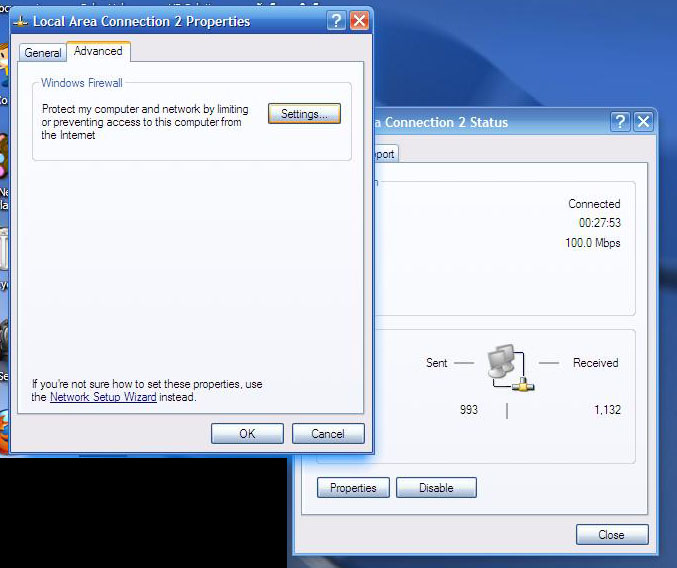
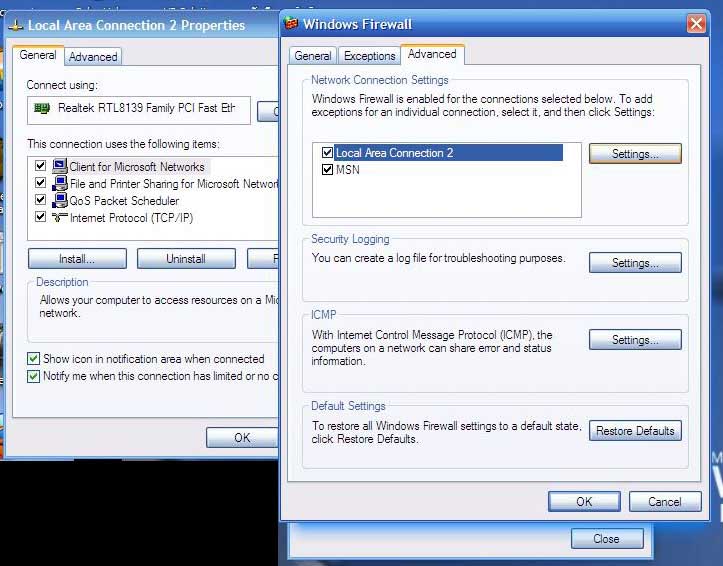
[member icon] 3. กลับมาดูหัวข้อ General เลือกที่ properties >>>>>>> จากนั้นมันจะขึ้นหัวข้อ General กับ Advance >>> เลือกหัวข้อ Advance >>> คลิกที่ Setting ครับ

30 เม.ย. 53 / 23:12
0 0
true@life [icon smile : 92 bytes] (4748) : n/a : n/a : n/a
followup id 613584 58.9.160.113

#3# - 613589 [icon-addtodelete : 101 bytes]
[member icon] ฟังอยุ่ๆ
30 เม.ย. 53 / 23:21
0 0
๑๓ มังกี้ [icon smile : 92 bytes] (599) : n/a : n/a : n/a
followup id 613589 58.64.72.83

#4# - 613590 [icon-addtodelete : 101 bytes]
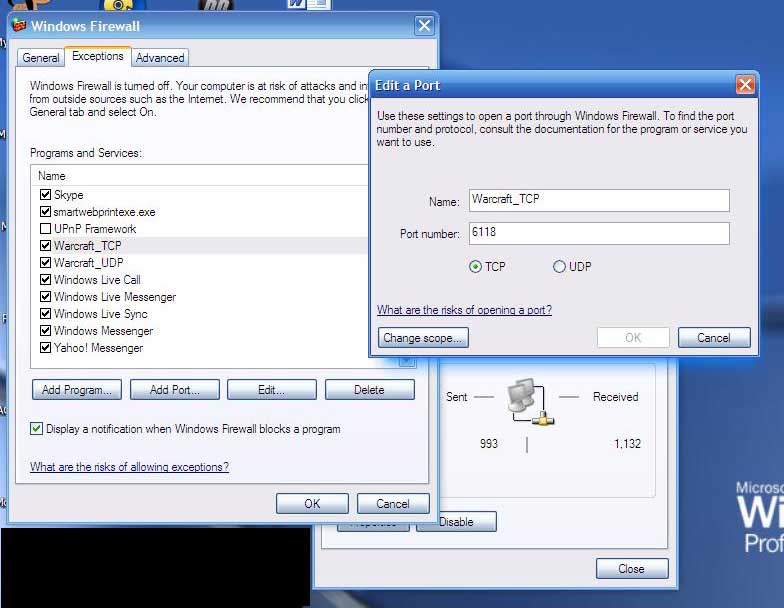
[member icon] 4. จากนั้นมันจะขึ้น 3 หัวข้อคือ General, Exceptions,Advance >>> ในหัวข้อ General ให้เลือก Off (not recommended) >>> ในหัวข้อ Exceptions ใครที่ยังไม่มี port Warcraft ให้เลือก Add port ครับ >>>> ใส่ Name : Warcraft_TCP >>> Port : 6118 (ยกตัวอย่างนะครับ จะเอา 6118 เลยก็ได้) >> เลือกจุดที่ TCP
>> Add ต้อง Add port 2 ครั้งนะครับ ครั้งแรกเป็น Warcraft_TCP ,6118 >>> ครั้งที่ 2 เป็น Warcraft_UDP ,6118 เลือกจุดที่ UDP

30 เม.ย. 53 / 23:21
0 0
true@life [icon smile : 92 bytes] (4748) : n/a : n/a : n/a
followup id 613590 58.9.160.113

#5# - 613591 [icon-addtodelete : 101 bytes]
[member icon] 5. มาดูหัวข้อ Advance เลือก Local Area Network Connection 2 (ของผมเป็น 2 นะ) จากนั้นเลือก Setting ที่อยู่ข้างๆ

30 เม.ย. 53 / 23:23
0 0
true@life [icon smile : 92 bytes] (4748) : n/a : n/a : n/a
followup id 613591 58.9.160.113

#6# - 613592 [icon-addtodelete : 101 bytes]
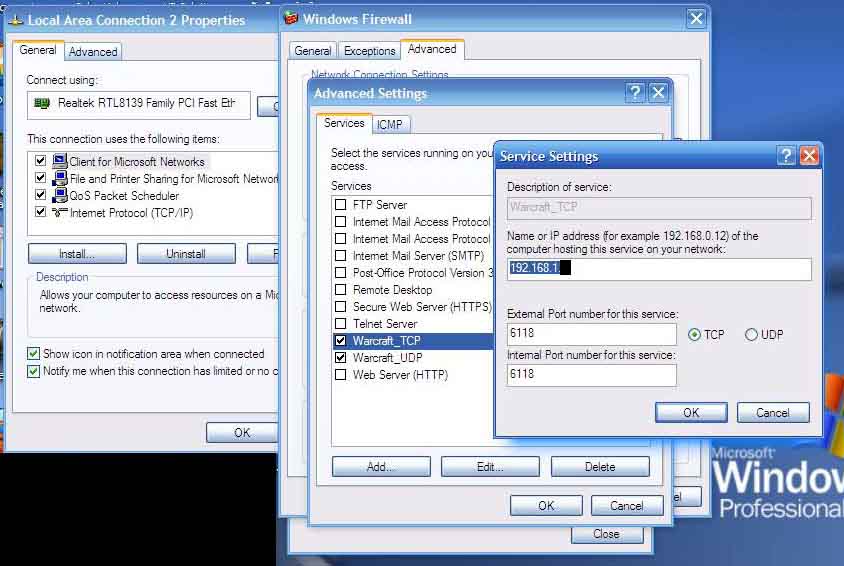
[member icon] 6. ว้าวๆ มีผู้ติดตามดูอยู่ด้วย !!! ต่อๆ ในหัวข้อ Service ให้เลือก Add >>> จากนั้นใส่ตามภาพเลยครับ ดูในช่อง Ip address เราต้องเอา Ip ของเราที่ให้จำไว้ในข้อ 2. มาใส่ครับ

Add 2 ครั้งเหมือนเดิมนะครับ อันนึงเป็น TCP อีกอันเป็น UDP (อย่าลืมจุดที่ TCP เมื่อเราทำ Warcraft_TCP และจุดที่ UDP เมื่อเราทำ Warcraft_UDP)

30 เม.ย. 53 / 23:28
0 0
true@life [icon smile : 92 bytes] (4748) : n/a : n/a : n/a
followup id 613592 58.9.160.113

#7# - 613595 [icon-addtodelete : 101 bytes]
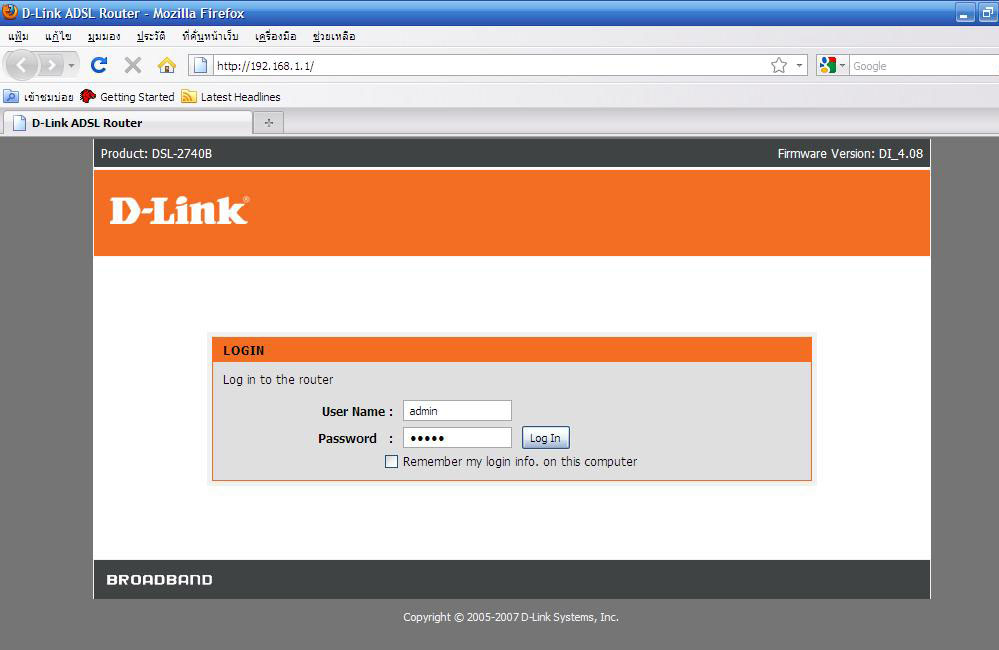
[member icon] 7. จากนั้น กด OK ออกมาเรื่อยๆเลยครับ >> จากนั้นให้เข้าเวบ (โดยทั่วไป) โดยพิมพ์ 192.168.1.1 ที่ช่องใส่ url ตามภาพครับ >>> ใส่ user : admin , pass : admin (ถ้าหากเรายังไม่มีการเปลี่ยน user หรือ pass นะครับ)

ปล.ของผมใช้ D-Link นะ , router ต่างรุ่นก็จะต่างกันออกไปนะครับ

30 เม.ย. 53 / 23:31
0 0
true@life [icon smile : 92 bytes] (4748) : n/a : n/a : n/a
followup id 613595 58.9.160.113

#8# - 613596 [icon-addtodelete : 101 bytes]
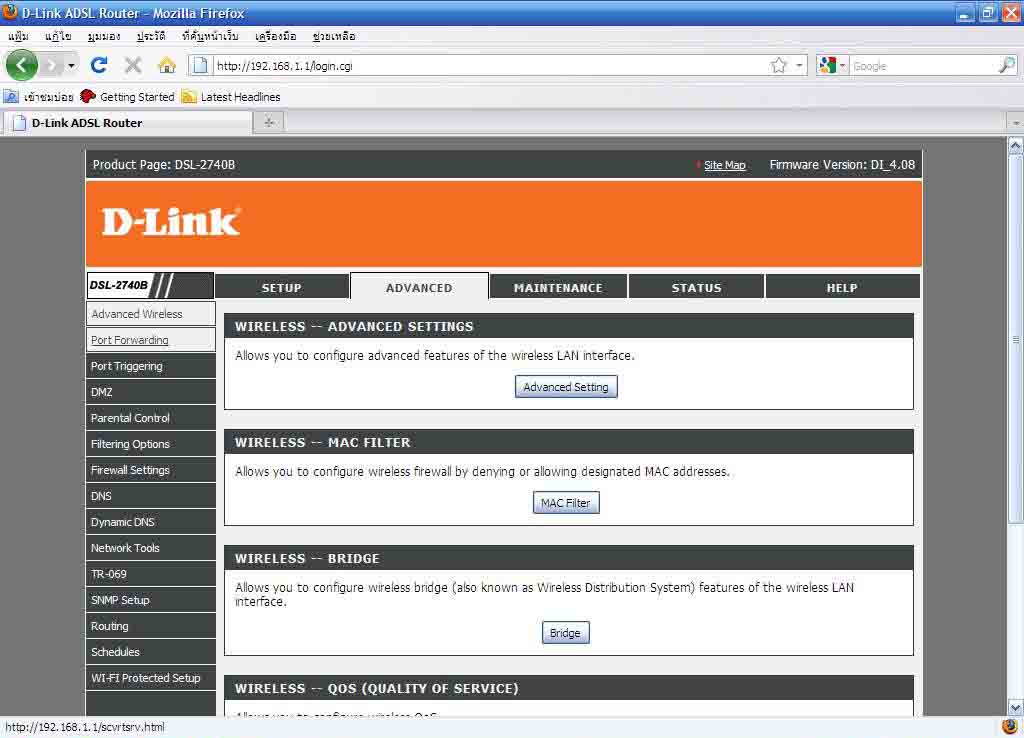
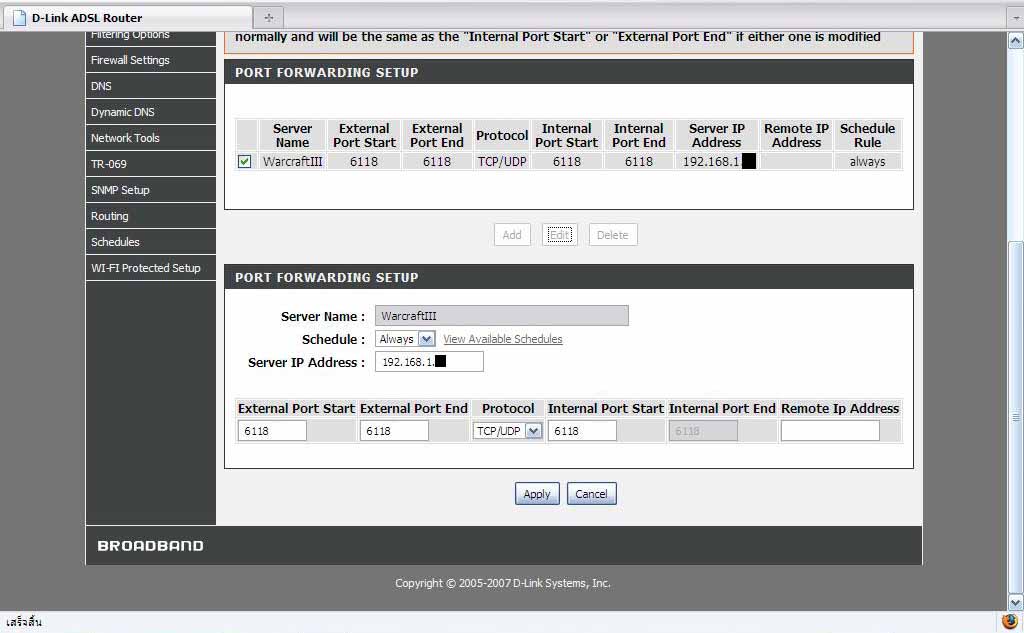
[member icon] 8. ตัวอย่างจาก router ของ D-Link นะครับ >>เลือก Advance >>> เลือก Port Forwarding

30 เม.ย. 53 / 23:33
0 0
true@life [icon smile : 92 bytes] (4748) : n/a : n/a : n/a
followup id 613596 58.9.160.113

#9# - 613597 [icon-addtodelete : 101 bytes]
[member icon] 9. Add port เข้าไป เลือก Server game เป็น Warcraft ตรง Server IP address : ให้ใส่ Ip ของเรานะครับ(จากที่ให้จำในข้อ 2.) นอกนั้นตามนั้นเลยครับ Port start , Port End ตามนั้นแล้วกันครับ ขี้เกียจพิมพ์และ

30 เม.ย. 53 / 23:36
0 0
true@life [icon smile : 92 bytes] (4748) : n/a : n/a : n/a
followup id 613597 58.9.160.113

#10# - 613599 [icon-addtodelete : 101 bytes]
[member icon] แนะนำอีกวิธีครับ ไปลองหาตัว crack tcg ที่ทำให้ use server to create game โดยไม่ต้องเป็น VIp ครับ:P ผมเคบมี ของ 0.22 อะ ver นี้ยังไม่มี
30 เม.ย. 53 / 23:40
0 0
__________________________________________________ [icon smile : 92 bytes] (2363) : n/a : n/a : n/a
followup id 613599 125.24.102.29

#11# - 613600 [icon-addtodelete : 101 bytes]
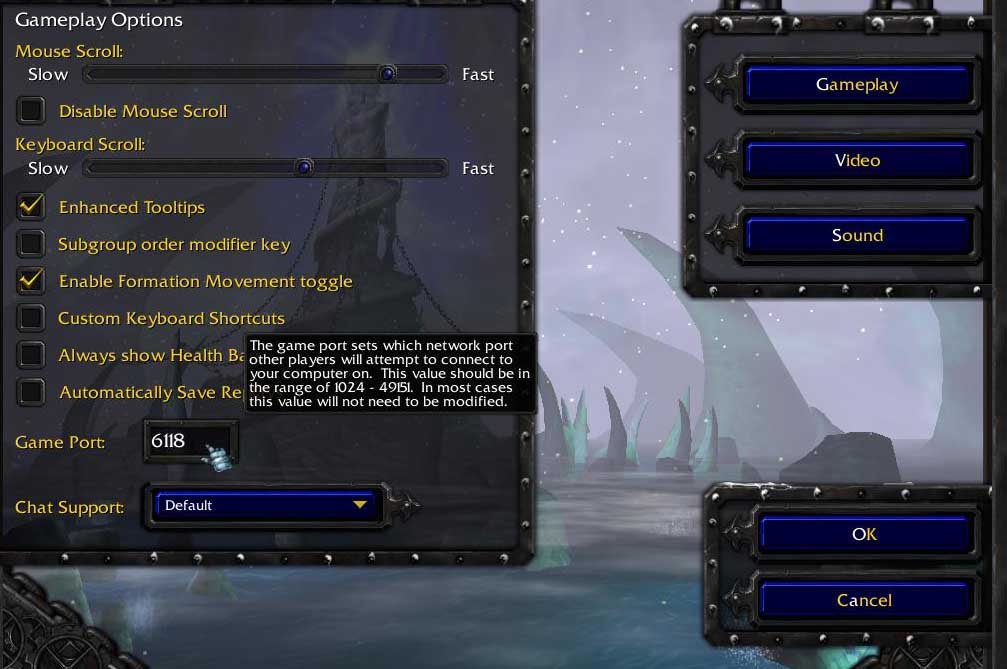
[member icon] 10. จากนั้นเข้าเกม Warcraft ของเรา >>> เลือก Options >>> Game play >>> เปลี่ยน game port ให้เป็น 6118 ตามภาพ

ปล. จิงๆไม่ต้องเป็น 6118 ก็ได้นะครับ 6112, 6113 อะไรประมาณนั้นก็ใช้ได้เหมือนกัน

ปล.2 ระวังในเรื่อง Ip ดีๆนะครับ ระวัง Ip คุณจะเปลี่ยนเมื่อปิดแล้วเปิด router ใหม่ ซึ่งต้องไปแก้ในส่วนที่เราใส่ค่า Ip ไปทั้งหมดครับ

30 เม.ย. 53 / 23:42
0 0
true@life [icon smile : 92 bytes] (4748) : n/a : n/a : n/a
followup id 613600 58.9.160.113

#12# - 613601 [icon-addtodelete : 101 bytes]
[member icon] หวังว่าคงช่วยบางท่านในนี้ได้นะ มีไรก็ถามๆไว้คับ ไว้มีเวลาจะมาตอบนะ
30 เม.ย. 53 / 23:44
0 0
true@life [icon smile : 92 bytes] (4748) : n/a : n/a : n/a
followup id 613601 58.9.160.113

#13# - 613620 [icon-addtodelete : 101 bytes]
[member icon] ลองทำทั้งหมดแล้ว ทั้งforward ทั้ง triggering ไม่รอดครับ -.-"
01 พ.ค. 53 / 03:02
0 0
T.suan123 [icon smile : 92 bytes] (100) : n/a : n/a : n/a
followup id 613620 58.64.62.208

#14# - 613629 [icon-addtodelete : 101 bytes]
[member icon] คือ กด advanceแล้วมันไม่มี port fowardingอะครับ
- -
01 พ.ค. 53 / 07:39
0 0
แดง129 [icon smile : 92 bytes] (6276) : n/a : n/a : n/a
followup id 613629 183.89.7.194

#15# - 613641 [icon-addtodelete : 101 bytes]
[member icon] ทำถูกต้องหมดแล้วตั้งแต่ก่อนหน้านี้ครับ
เดิม create ได้ปกติแต่พออัพแพทช์ vip ปุ๊บมันก็เน่า - -

ช่างมันหนีไปเล่นร้าน
01 พ.ค. 53 / 10:29
0 0
Pomzazed Firecat 122 [icon smile : 92 bytes] (512) : n/a : n/a : n/a
followup id 613641 58.9.2.188